Free plugin introduction
A Free Chord Track Plugin for DAWs Without One
Chord Dock Lite is a free plugin for producers who want to build, hear, organize, and export chord progressions without keeping every harmony decision buried in MIDI notes.
By K2get, developer of Chord Dock · August 14, 2026 · 5 min read
Some DAWs offer a dedicated chord track. In others, the progression lives only inside MIDI clips and piano rolls. That is perfectly workable until you want to compare two harmonic ideas, move an entire Chorus, or see the song’s structure without opening a series of note editors.
Chord Dock Lite was made for that gap. It gives a progression its own place to live before you turn it into the detailed MIDI arrangement in your DAW.
When harmony lives only in the piano roll
A piano roll is the right tool for notes, voicings, and performance detail. But it is not always the fastest place to answer a larger question such as, “Would Dm work better here than Am?” You have to find the notes, replace them, check the voicing, then zoom back out to remember what the progression was doing.
A chord track changes the level at which you work. Instead of seeing C, Am, F, and G only as note groups, you see them as the harmonic steps of the song. You can listen, change one step, and keep the rest of the progression in view.
An introduction to Chord Dock Lite
With Chord Dock Lite, you place chords directly on a timeline. You can move them, change their length, try another chord, and audition the result while looking at the whole progression. The Chord Palette follows the key and scale you choose, helping you explore diatonic alternatives without rebuilding each chord note by note.
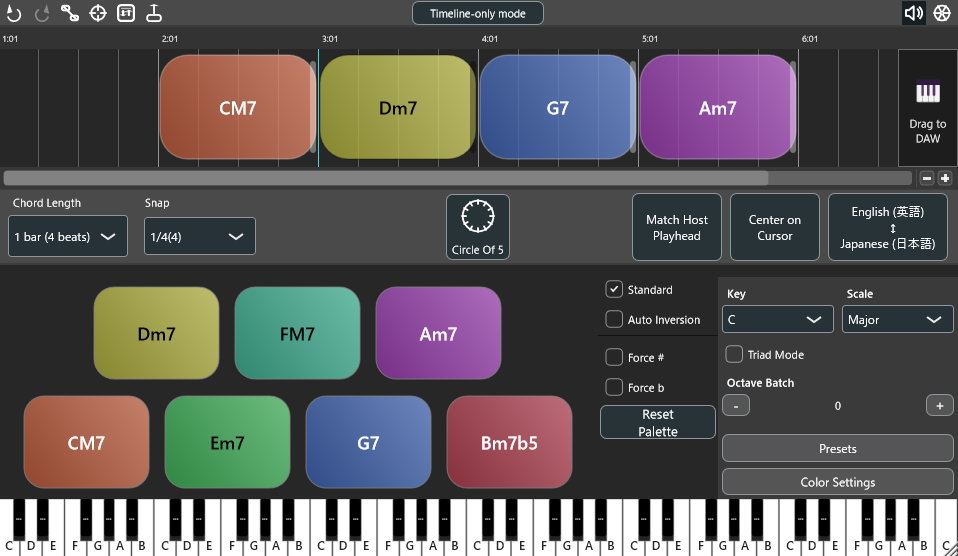
You can also group the progression into Sections such as Verse, Chorus, and Bridge. That makes it easier to copy or reshape a part of the song while keeping its harmonic structure readable. When an idea is ready, drag the MIDI into the instrument tracks you already use in your DAW. Lite can also save progressions and export PDF chord charts.
Who it is for
Chord Dock Lite is for writers and producers who already have musical ideas and want a clearer way to work through them. It is useful when you want to sketch a progression, test substitutions, organize the harmony of a song, and hand the result to the instruments in your existing session.
It is not an automatic songwriting AI or a replacement for arranging your own music. The point is to make your harmonic decisions easier to see, hear, and revise.
Try Chord Dock Lite free
The core timeline workflow, Sections, MIDI export, and PDF chord-chart export are available in Lite at no cost. You can decide whether it belongs in your process before considering anything else.
Download Chord Dock Lite freeChord Dock also has editions for deeper harmony work and accompaniment performance. For the complete feature overview and edition comparison, visit the official Chord Dock page.